Support
If you have any general questions or suggestions, please feel free to reach out.
If you need technical support for a specific issue, create the smallest sanitized workbook that reproduces the problem. Remove confidential, personal, credential, and production data before sharing it.
Send the workbook or a restricted sharing link to support. Grant only the access needed to reproduce the issue; do not make the file public or grant edit access unless support specifically needs it for the reproduction. Include the affected product, Excel host (desktop or web), the steps to reproduce, and the exact error message when available.
FAQ
After uninstalling the add-in, I get a recurring prompt to re-install it.
This is an Excel quirk with all add-ins. Excel embeds a reference to the add-in in the xlsx file which keeps triggering this. To remove it you need to do the following:
- Open Document Inspector:
File > Info > Check for Issues > Inspect Document - Ensure the boxes for Content Add-ins and Task Pane Add-ins are checked, they should be by default.
- Run the inspection and click Remove All next to the Content Add-ins or Task Pane Add-ins that were found.
Add-in will not install
Try using it with Excel on web. If it works there, something is likely corrupted in your local cache and you need to clear it. See: Clear the Office cache
If it won’t load in Excel on web, then your IT admin needs to unblock it. This process varies by tenant configuration.
Error: Add-in failed to download a required resource
If you see an “Error installing add-ins” message stating that the add-in “failed to download a required resource”, it is usually caused by a corrupted local cache.
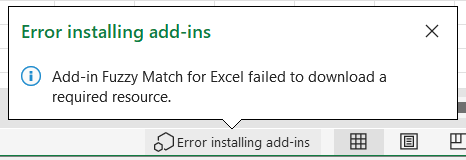
Try manually clearing the Office cache and then restart Excel.