Custom Functions
Custom Functions
Result preview
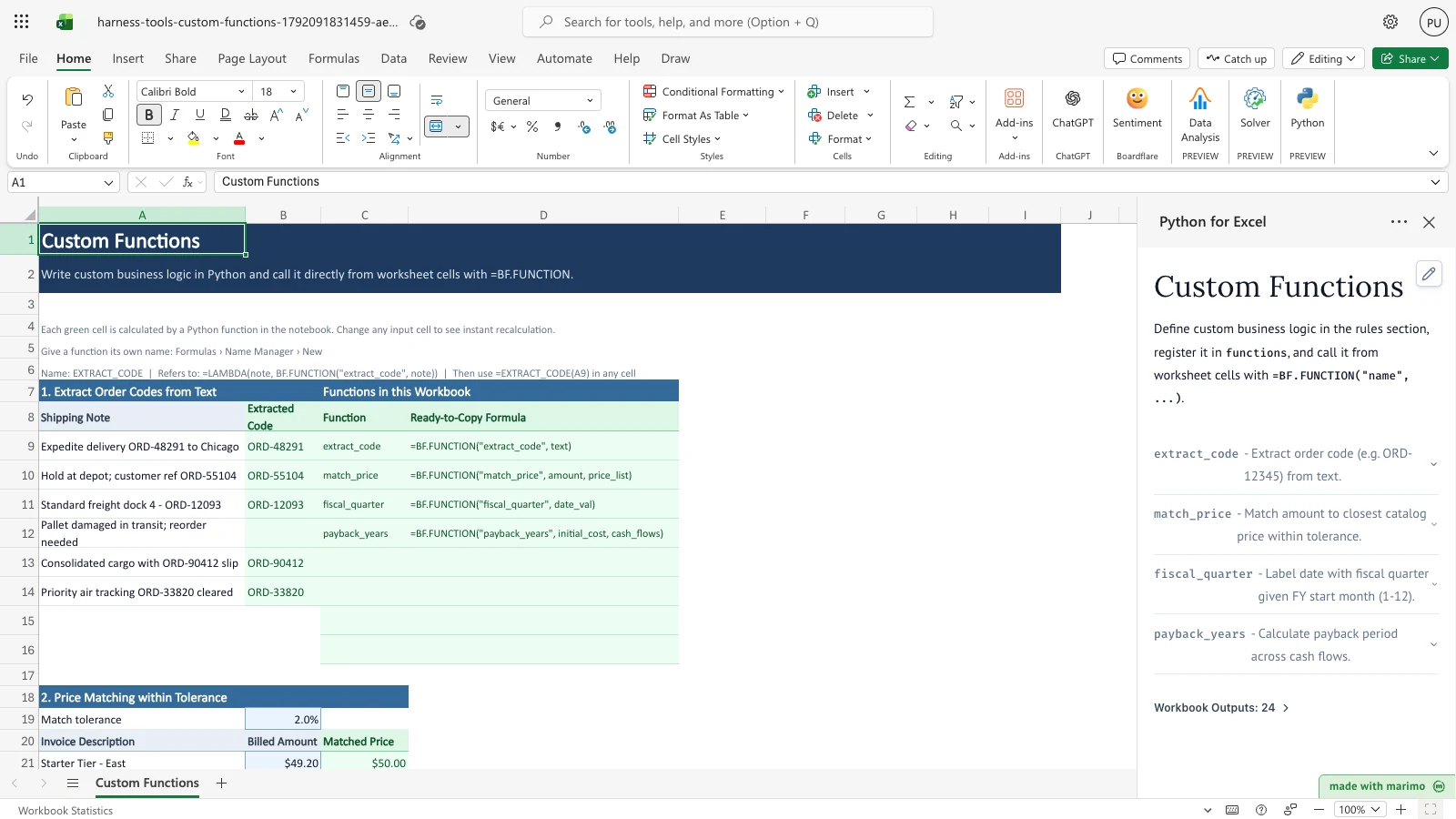
When you open the workbook, four analytical panels immediately calculate custom business operations that are difficult or fragile in traditional spreadsheet formulas: - Order code extraction: Isolates standardized tracking codes (such as ORD-48291) from unstructured, free-form delivery notes, leaving non-code entries cleanly blank. - Tolerance price matching: Matches irregular billed amounts against an approved price list within a configurable tolerance band (default 2%), flagging non-matching items as No match. - Fiscal quarter calendar: Maps project milestones to your organization’s specific fiscal calendar based on a configurable fiscal-year start month. - Investment payback period: Computes fractional payback years across multi-year uneven cash flows, accounting for negative intermediate flows and identifying projects that never reach breakeven.
Each result column is powered by a central Python function in the workbook’s notebook, evaluated live in worksheet cells using =BF.FUNCTION("name", ...).
What this template does
This template demonstrates how Boardflare allows analysts to author business logic once in Python and deploy it across the worksheet as reusable formula functions.
Traditional spreadsheets require complex, nested workarounds or volatile user-defined code for tasks like regular-expression extraction, fuzzy numeric lookups, custom fiscal dates, and cumulative cash flow calculations. With Boardflare: 1. You write concise Python functions in the embedded notebook. 2. You call those functions from ordinary worksheet cells with =BF.FUNCTION("function_name", arguments...). 3. You drag or fill formulas down table columns just like built-in Excel functions. 4. When underlying cells or settings change, dependent function cells update reactively.
Why Python
While basic arithmetic and exact lookups belong in standard spreadsheet formulas, custom business logic frequently stretches formula engines past their design limits: - String parsing: Standard formulas struggle with variable-length free text. Python’s re module offers concise, robust pattern matching to extract structured identifiers. - Tolerance matching: Lookup formulas like XLOOKUP or INDEX/MATCH expect exact or sorted interval keys. Python easily scans multi-cell arrays, compares percentage deltas, and chooses the optimal target within a tolerance band. - Flexible calendar logic: Fiscal calendars with non-standard start months often require long, brittle IF, CHOOSE, or MOD chains. Python maps dates to fiscal periods with clear, maintainable arithmetic. - Iterative financial analysis: Determining fractional breakeven across uneven annual cash flows requires procedural accumulation that formulas cannot perform without helper columns. Python computes the exact decimal payback year in a single function call, properly subtracting negative flows from cumulative recovery. - Single point of maintenance: Unlike cell-bound scripts that duplicate code across rows, Boardflare functions reside in one notebook. Updating logic or adjusting thresholds updates every formula call in the workbook simultaneously.
Operating workflow
Author: A financial modeler or data engineer defines reusable functions, input boundaries, and publishing anchors in the notebook.
Workbook user: An operational analyst or financial manager enters transaction notes, invoice prices, milestone dates, and investment proposals in standard Excel cells. The functions calculate immediately without requiring the user to inspect or edit Python code.
In App mode, Boardflare hides the notebook editor to provide a distraction-free, focused spreadsheet interface for day-to-day operators while preserving live calculation capabilities. App mode modifies presentation rather than permissions, source access, or workbook trust.
Download the Excel template
Inputs and assumptions
The workbook organizes four functional areas across one dashboard: 1. Shipping Notes (A9:A14): Realistic shipping logs containing embedded order codes (e.g. ORD-48291), with extracted codes in B9:B14 and an exception note without a code. 2. Invoice Items and Prices (A21:B26): Billed line items and billed amounts, evaluated alongside a match tolerance cell (B19, defaulting to 2.0%) and a Catalog Price List (A30:B34). 3. Project Dates and Fiscal Start (A39:B44, B37): Project milestone dates spread across the calendar year, alongside cell B37 setting the fiscal-year start month (defaulting to October, month 10). 4. Capital Investment Proposals (A48:I52): Projects with initial costs (B48:B52) and 5-year cash flows (E48:I52), including a negative year in Year 2 on Solar Roof Installation (F49) and a non-recovering investment (C51).
Notebook implementation
The embedded notebook.py contains the four calculation routines and the publication contract:
def _to_floats(val):
    if val is None or val == "":
        return []
    if isinstance(val, (int, float)):
        return [float(val)]
    if isinstance(val, str):
        try:
            return [float(val.replace("$", "").replace(",", "").strip())]
        except ValueError:
            return []
    return [f for row in val for f in _to_floats(row)] if isinstance(val, (list, tuple)) else []

def extract_code(text):
    """Extract order code (e.g. ORD-12345) from text."""
    if not text or not isinstance(text, str):
        return ""
    match = re.search(r"\b[A-Z]{2,4}-\d{4,6}\b", text)
    return match.group(0) if match else ""

def match_price(amount, price_list, tolerance=0.02):
    """Match amount to closest catalog price within tolerance."""
    amt, prices = _to_floats(amount), _to_floats(price_list)
    if not amt or not prices:
        return "No match"
    target, tol = amt[0], float(tolerance)
    best = [p for p in prices if p > 0 and (abs(target - p) / p) <= tol]
    return min(best, key=lambda p: abs(target - p)) if best else "No match"

def fiscal_quarter(date_val, fy_start_month=10):
    """Label date with fiscal quarter given FY start month (1-12)."""
    if date_val is None or date_val == "":
        return ""
    try:
        start_f = float(fy_start_month) if fy_start_month is not None else 10.0
    except (TypeError, ValueError):
        return "Check FY month"
    if not (1 <= start_f <= 12) or start_f != int(start_f):
        return "Check FY month"
    start_m = int(start_f)
    if isinstance(date_val, (datetime.date, datetime.datetime)):
        y, m = date_val.year, date_val.month
    elif isinstance(date_val, (int, float)):
        dt = datetime.date(1899, 12, 30) + datetime.timedelta(days=int(date_val))
        y, m = dt.year, dt.month
    elif isinstance(date_val, str):
        try:
            dt = datetime.date.fromisoformat(date_val.split("T")[0].strip())
            y, m = dt.year, dt.month
        except ValueError:
            return "Check date"
    else:
        return "Check date"
    q = ((m - start_m) % 12 // 3) + 1
    fy = y if start_m == 1 else (y + 1 if m >= start_m else y)
    return f"Q{q} FY{fy}"

def _cash_flows(val):
    """One float per cell, blank cells as 0.0; None if any cell is not numeric."""
    rows = val if isinstance(val, (list, tuple)) else [val]
    cells = [c for row in rows for c in (row if isinstance(row, (list, tuple)) else [row])]
    out = []
    for c in cells:
        if c is None or c == "":
            out.append(0.0)
        elif isinstance(c, (int, float)):
            out.append(float(c))
        else:
            try:
                out.append(float(str(c).replace("$", "").replace(",", "").strip()))
            except ValueError:
                return None
    return out

def payback_years(initial_cost, cash_flows):
    """Calculate payback period across cash flows.
    Blank years count as zero, so each year keeps its position. A non-numeric year returns "Check input"."""
    costs, flows = _to_floats(initial_cost), _cash_flows(cash_flows)
    if flows is None:
        return "Check input"
    if not costs or costs[0] <= 0:
        return 0.0 if costs else "Never"
    rem = costs[0]
    for idx, cf in enumerate(flows, start=1):
        if cf > 0 and rem <= cf:
            return round(idx - 1 + (rem / cf), 2)
        rem -= cf
    return "Never"
The notebook registers these functions and publishes a dynamic catalog table directly to the worksheet:
functions = {
    "extract_code": extract_code,
    "match_price": match_price,
    "fiscal_quarter": fiscal_quarter,
    "payback_years": payback_years,
}

# Publish the functions by name, plus the catalog table
publication = bf.publish(
    outputs={"summary": summary},
    functions=functions,
)
How the calculation/model works
- Cell Invocation: In Excel, entering
=BF.FUNCTION("match_price", B21, $B$30:$B$34, $B$19)passes the scalar value inB21, the 2D array in$B$30:$B$34, and the tolerance in$B$19into Python. - Type Coercion: Range arguments arrive as nested lists and numeric cells as numbers or strings. The helper normalizes inputs into float sequences while preserving missing or invalid tokens.
- Calculation & Return: The Python callable executes synchronously. If successful, scalars return directly into the calling worksheet cell without spilling.
- Formula Aliases with Named LAMBDA: Users can define clean aliases in Excel’s Name Manager (for instance
EXTRACT_CODE = LAMBDA(note, BF.FUNCTION("extract_code", note))), allowing team members to write=EXTRACT_CODE(A9)with native Excel syntax.
Architecture
- Function-only input model: All cell inputs flow directly to
=BF.FUNCTION(...)arguments in worksheet formulas. The notebook deliberately omitsbf.inputs(...). - Dynamic catalog registration: Defining a function in the
# --- Edit these rules ---cell ofnotebook.pyand adding it to thefunctionsdictionary automatically registers its worksheet callable, extracts docstrings and source code into the accordion inspector, and updates the ready-to-copy formula summary. - Catalog spill sizing: The
summarycatalog spill is anchored toC8:D16and padded for up to 8 functions. Registering more than 8 functions requires expandingspillRefinworkbook.pyand updating the summary padding loop innotebook.py.
Validation / expected results
Every function calculates upon opening the workbook, producing consistent baseline results:
| Calculation | Test Cell | Expected Outcome |
|---|---|---|
| Order Code Extraction | B9 |
ORD-48291 |
| Missing Code Fallback | B12 |
(blank) |
| Price Match | C21 |
$50.00 |
| Out of Tolerance Price | C24 |
No match |
| Fiscal Quarter (Oct start) | C39 |
Q1 FY2026 |
| Payback Period (Warehouse) | C48 |
2.80 |
| Payback with Negative Flow (Solar) | C49 |
3.75 |
| Non-Recovering Investment | C51 |
Never |
When user inputs change, formulas recalculate immediately: - Changing the fiscal-year start month (B37) from 10 to 1 shifts milestones (C39, C41, C42). - Tolerance B19 or invoice amount B21 exceeding tolerance changes C21 to No match. - Increasing Year 1 cash flow on Warehouse Automation (E48) shortens payback (C48) from 2.80 to 2.00. - Modifying Year 2 cash flow on Solar Roof (F49) shortens payback (C49) from 3.75 to 3.12.
Limitations
- Order code regex:
extract_codematches[A-Z]{2,4}-\d{4,6}case-sensitively with a hyphen and returns only the first code found in the text. - Banker’s rounding:
payback_yearsuses Pythonround(..., 2), which rounds exact ties to the nearest even number (e.g. 3.125 rounds to 3.12). - Sizing: This template is an interactive example with multi-panel layout on one dashboard.
- Workbook-level scope: Custom functions execute within the Boardflare session of the active workbook. They cannot modify unrelated external files or invoke unapproved network APIs.
- Calculation latency: For large tables with thousands of individual formula cells, vectorized table outputs using
BF.OUTPUTmay provide faster bulk throughput than thousands of individual cell-levelBF.FUNCTIONinvocations. - Side effects: Functions are pure calculation routines. They return values to their calling cell and cannot mutate formatting or modify neighboring cells directly.
When to use this approach
- Regex and text parsing: When extracting IDs, phone numbers, or structured codes from unstructured strings.
- Complex matching rules: When matching transactions based on tolerances, date windows, or scoring logic beyond standard spreadsheet lookups.
- Custom calendars: When calculating enterprise fiscal periods, working days with custom holiday schedules, or retail 4-4-5 calendars.
- Iterative financial models: When computing metrics that require procedural iteration (such as exact payback periods, loan amortizations, or root-finding).