Customer Details
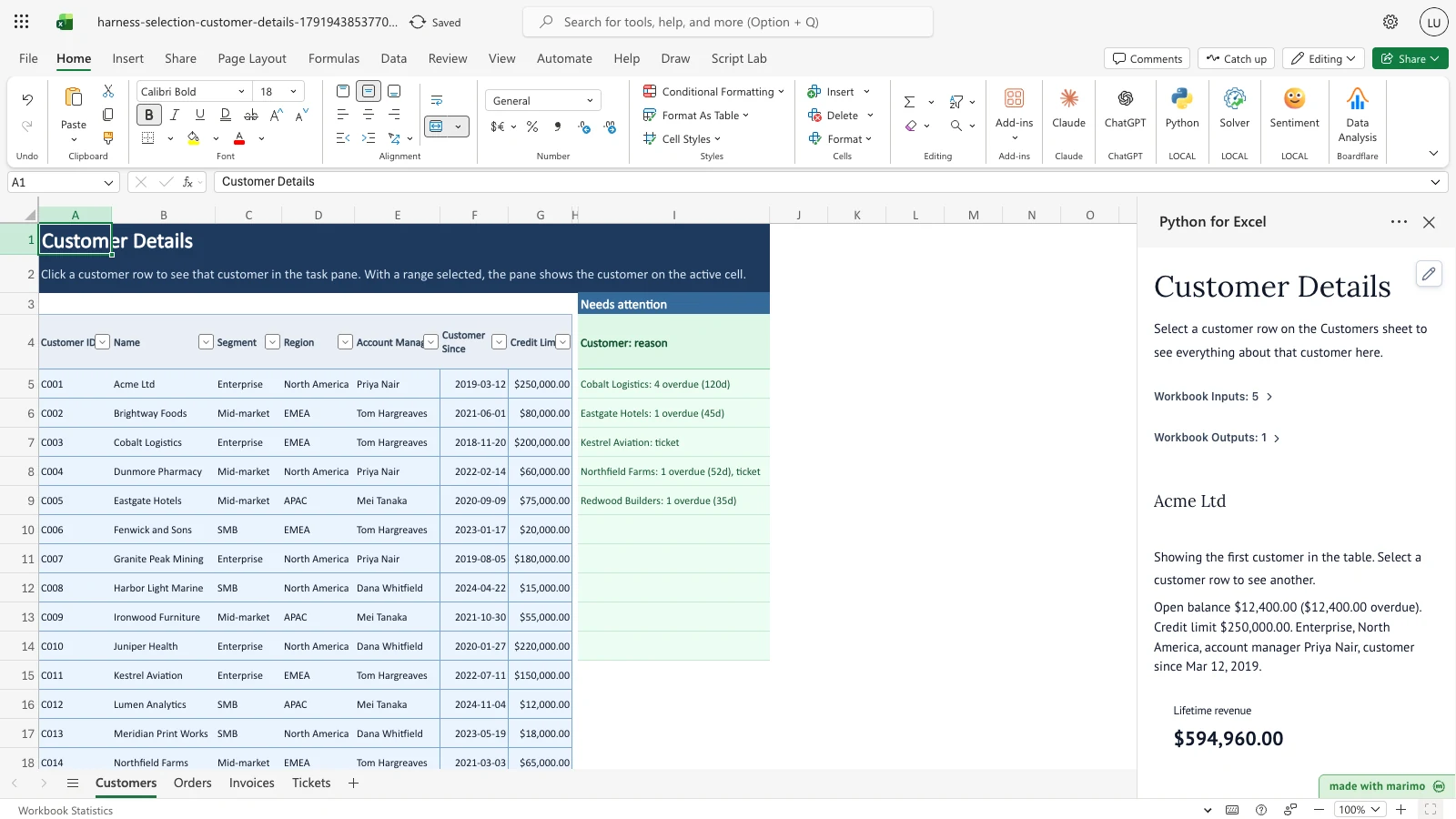
Answer “what is going on with this customer?” before a call. Keep customers, orders, invoices and support tickets in separate tables, click a customer row, and the task pane shows everything about that customer: revenue, open balance, overdue amounts, open tickets, recent orders and a monthly revenue chart.
Result preview
With nothing selected, the pane shows the first customer, Acme Ltd, labelled as such, with $12,400.00 of open balance that is overdue. Selecting Cobalt Logistics shows $76,950.00 open and overdue across four invoices. A “needs attention” list beside the table names five customers and why.
What this template does
The Customers table sits on the first sheet with a needs-attention list beside it. Selecting a customer row shows that customer in the task pane: key facts, lifetime revenue, last order date, open balance and the part that is overdue, open tickets, recent orders, open invoices with days overdue, and a monthly revenue chart, with flags for anything that needs action. A selection that covers several rows shows the customer on the active cell, the cell the cursor is on. The attention list does not depend on the selection.
Why Python
Joining four tables, counting days overdue, comparing quarters and drawing a chart for whichever row you click would take filters or a stack of lookups in formulas. Python does it in one pass for any selected customer and recalculates as you edit the data.
Operating workflow
Author: A technical maintainer owns workbook.py, notebook.py, deterministic scenarios, and the generated package.
Workbook user: An account manager or accounts-receivable clerk selects customers and edits the tables (for example marking an invoice paid) without maintaining the Python source. App mode changes presentation rather than permissions, source access, or workbook trust.
Download the Excel template
Inputs and assumptions
Customers(first sheet): Customer ID, Name, Segment, Region, Account Manager, Customer Since, Credit Limit.Orders: Order ID, Customer ID, Order Date, Product, Amount, Status. Cancelled orders do not count as revenue.Invoices: Invoice ID, Customer ID, Issued, Due, Amount, Paid. Open balance is Amount less Paid; set Paid to the Amount to mark an invoice paid.Tickets: Ticket ID, Customer ID, Opened, Priority, Subject, Status. Any status other than Closed is open.- Days overdue are counted to 2026-09-30 in the sample; a customer is on the attention list when an invoice is more than 30 days overdue or a high-priority ticket is open.
Notebook implementation
One bf.inputs(...) reads the four tables and bf.selection("Customers"). Python converts Excel dates, works out each customer’s figures, and shows the selected customer, the row at the active cell (or the first one when nothing is selected). bf.publish(...) sends the selection-independent attention list to the sheet. The marked # --- Edit these rules --- section holds the overdue threshold, the high-priority label, how many recent orders show, the quarter-drop flag, and the list of related tables, so another table can be added: list it in TABLES, add any new date columns to DATE_COLUMNS, and add a PANELS line (open-invoice and open-ticket filtering is prepared in the data cell below the rules and would need a matching line for a new table).
How the calculation/model works
For each customer: lifetime revenue and last order date from non-cancelled orders; open balance as the sum of Amount less Paid on invoices; overdue as the open balance on invoices past their due date; open tickets as tickets not Closed. A customer is flagged when orders in the last quarter fall below half of the quarter before, or when they have overdue invoices past the threshold or an open high-priority ticket. Orders whose Customer ID matches no customer are reported in a data check line. The quarter-drop flag appears in the pane only, not in the attention list.
Architecture
- Selection decoupling: User row selection affects only the task pane display. The published
attentionspill encompasses all customers across the workbook and never writes selection-dependent state back into worksheet cells. - Fixed spill contract: The
attentionspill occupies a fixed 11-row block (Customers!I4:I14). If more than 9 customers qualify, the tenth entry summarizes overflow as+N more. Expanding this capacity requires synchronized updates tooutput_block/outputAnchorsinworkbook.pyand the padding logic innotebook.py. - Cross-source date coupling:
workbook.pyextractsAS_OFdirectly fromnotebook.pysource text via regex to ensure synthetic transaction dates align exactly with the notebook’s overdue evaluation reference.
Validation / expected results
| Check | Expected outcome |
|---|---|
| Customers on the attention list | 5 |
| First customer shown with nothing selected | Acme Ltd, open balance $12,400.00 |
| Cobalt Logistics selected | open balance $76,950.00 |
| New customer with no orders selected | “No orders yet” message |
| Several rows selected, active cell on Brightway Foods | Brightway Foods, the customer on the active cell |
Marking Eastgate Hotels’ only overdue invoice as paid sets its open balance to $0.00 and removes it from the attention list, leaving four customers. Marking Northfield Farms’ overdue invoice as paid keeps it listed because of its open high-priority ticket.
Limitations
The pane is read-only: edit records in the tables, not in the pane. It shows one customer, the row at the active cell. The attention list shows 10 customers; when more qualify, the last row reads “+N more”. Days overdue use a fixed date in the sample. There is no sync with a CRM or accounting system.
When to use this approach
Use it when people ask about one customer at a time and the answer spans several tables exported from different systems.