Interconnection
Overview
Introduction In control engineering, interconnection is the process of combining simpler dynamic subsystems into a larger closed-loop model that represents a real machine, process, or software-controlled plant. In practice, almost no deployed control system is a single transfer function. Instead, engineers connect sensors, controllers, filters, actuators, and plant dynamics in structured patterns such as series (cascade), parallel paths, and feedback loops. Those patterns define how signals propagate and, critically, how disturbances and modeling errors are amplified or attenuated. A concise mathematical background appears in feedback, block diagram, and transfer function references, but Boardflare’s interconnection tools focus on getting these combinations into a reliable computational form quickly.
This category is built on the Python Control Systems Library, exposed through three calculators: FEEDBACK, PARALLEL, and SERIES. Each calculator accepts transfer-function coefficient data and returns a computed closed-form system representation. That matters because interconnection is where design intent becomes analyzable dynamics. Once a model is interconnected, teams can evaluate poles, bandwidth, damping, disturbance rejection, and expected response before hardware commissioning.
From a business and operations perspective, interconnection modeling reduces expensive iteration. A controls team can test architecture choices (for example, adding feedforward in parallel, changing loop sign, or adding a cascade compensator) before a test stand or plant trial. In regulated environments—energy, aerospace, process manufacturing, medical devices—this also supports traceability: reviewers can see exactly which subsystem relationships were used in final tuning studies.
Interconnection is also a common bridge between spreadsheet workflows and modern computational analysis. Many teams begin with quick equations in Excel and then move to Python-based validation for robustness checks. The calculators in this category preserve that accessibility while using rigorous backend implementations from control. For users who think in numerator/denominator coefficients, this category provides an immediate way to move from component-level transfer functions to system-level dynamics.
At a high level, the three operations are:
- Cascade multiplication with SERIES, representing sequential signal flow.
- Algebraic summation with PARALLEL, representing additive path contributions.
- Closed-loop coupling with FEEDBACK, representing error-driven correction.
Together, they cover the most common block-diagram reductions used in classical control analysis and controller prototyping.
When to Use It Use this category when the primary task is “compose a system architecture and understand the resulting dynamics,” not just “analyze one pre-built transfer function.” In other words, interconnection tools are for synthesis and restructuring of models.
One common job-to-be-done is drive or motion-control design. Suppose a manufacturing line has motor dynamics, a gearbox, a current-loop controller, and a position-loop controller. The design engineer often starts by placing the plant and compensators in cascade, then evaluates alternative feedback paths for sensor placement or derivative filtering. SERIES is used to combine forward-path elements, FEEDBACK closes the loop with unity or non-unity sensing dynamics, and PARALLEL can add auxiliary feedforward torque compensation. This workflow helps answer practical questions like: “Will this architecture improve settling time without destabilizing high-frequency behavior?”
Another frequent scenario is process-control retrofit in chemical or energy systems. Legacy loops may include parallel corrective paths (for example, base PID action plus a separate disturbance estimator). Engineers can model the existing plant/controller path and then add retrofit dynamics in parallel to compare old-versus-new loop characteristics. Here, PARALLEL represents additive control action, while FEEDBACK captures the closed-loop result under realistic sensor transfer functions. Teams use this to estimate whether a modernization project will reduce variance enough to justify downtime and capital spend.
A third scenario appears in embedded and robotics development. During rapid prototyping, architecture changes happen frequently: adding a prefilter, reordering blocks, or switching from negative to positive loop interpretation during debugging. Instead of manually deriving each symbolic transfer function, developers can quickly recompute with SERIES, PARALLEL, and FEEDBACK. This reduces algebra errors and supports faster iteration in CI-friendly modeling notebooks.
Interconnection tools are especially valuable when:
- A model has more than one dynamic element and manual reduction is error-prone.
- Alternative control architectures must be compared under schedule pressure.
- Teams need transparent formulas for reviews, validation reports, or design history files.
- A spreadsheet-native workflow needs a reproducible bridge to scientific-control tooling.
They are less appropriate when the task is parameter identification directly from data (system ID), nonlinear simulation with saturation/dead zones as first-class features, or full state-space synthesis without transfer-function abstraction. In those cases, interconnection may still be part of the pipeline, but it is not the whole workflow.
How It Works All three tools rely on linear time-invariant (LTI) algebra. If two subsystems are represented by transfer functions G_1(s) and G_2(s) (or z-domain equivalents), interconnection rules determine the composite transfer function.
For series interconnection, outputs feed directly into downstream inputs:
G_{\text{series}}(s) = G_1(s)G_2(s)
This is what SERIES computes. In coefficient form, numerators multiply and denominators multiply, increasing polynomial order. Physically, this represents chained dynamics such as actuator-to-plant or controller-to-filter-to-plant.
For parallel interconnection, path outputs add:
G_{\text{parallel}}(s) = G_1(s) + G_2(s)
This is what PARALLEL computes. The resulting denominator is typically the least common polynomial denominator, and numerator terms combine after alignment. Parallel structure is common for feedforward plus feedback contributions or multi-path compensation.
For feedback interconnection with forward path G(s) and feedback path H(s), the canonical closed-loop map from reference to output is:
T(s) = \frac{G(s)}{1 \pm G(s)H(s)}
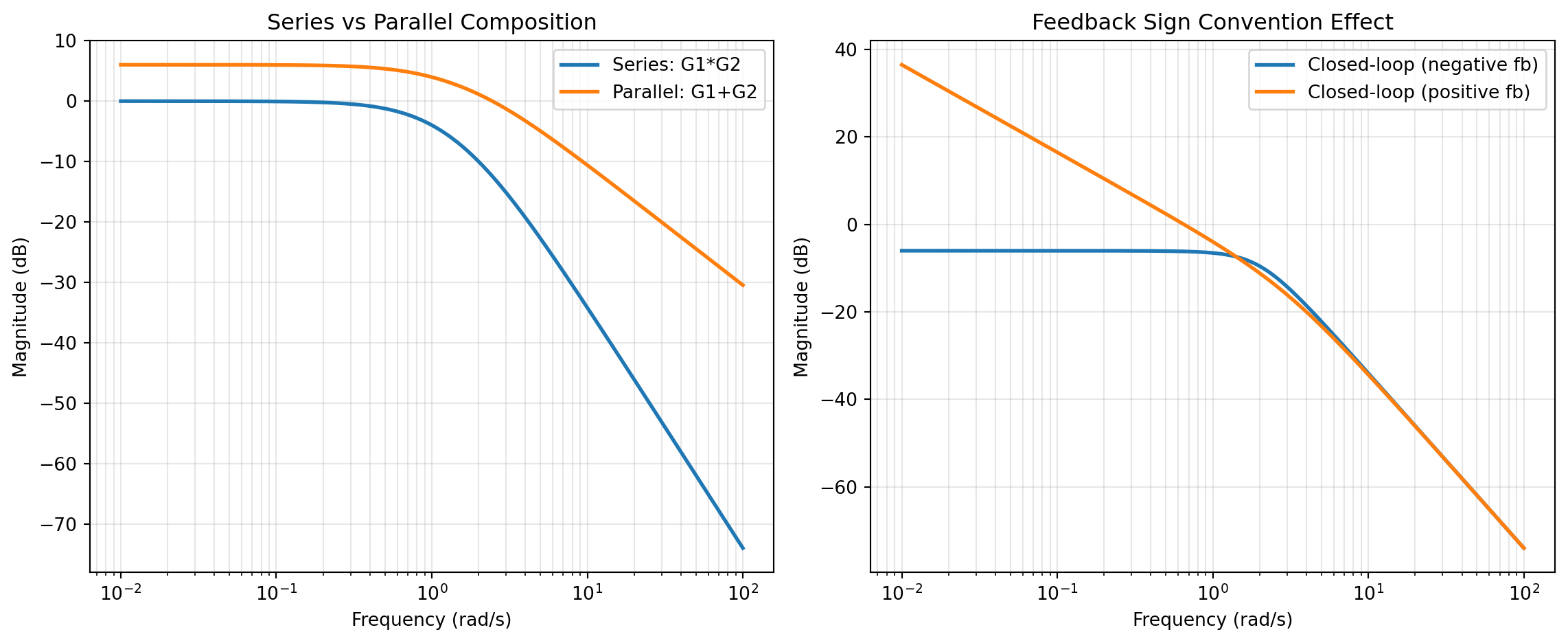
The sign depends on loop convention. In Boardflare’s FEEDBACK, positive = false corresponds to negative feedback, while positive = true flips sign convention for positive feedback modeling. In stability discussions, negative feedback typically improves robustness margins when loop gain and phase are favorable; positive feedback generally increases sensitivity and can drive instability if not intentionally designed.
Under the hood, these calculators parse user-provided numerator/denominator arrays, convert them into transfer-function objects, and call the corresponding Python Control APIs (control.series, control.parallel, control.feedback). The category’s upstream reference docs are:
This implementation choice is important for reliability: the same computational primitives used in research and production control notebooks are used in these calculators.
Mathematically, several assumptions apply:
- Systems are modeled as LTI in the operating region of interest.
- Transfer-function representation is valid (typically SISO in the current calculator interface).
- Coefficient ordering and sign conventions are entered correctly by the user.
- Algebraic interconnection does not, by itself, guarantee acceptable real-world performance; it only defines the model.
Engineers should also interpret results in terms of poles and zeros of the interconnected model. Because interconnection changes polynomial order and coupling, small structural edits can materially shift dominant poles and damping ratios. A practical rule: every architecture change should be followed by stability and transient checks (step response, margins, pole locations), even when the algebraic connection itself is straightforward.
Another useful perspective is sensitivity. For a standard negative feedback loop, sensitivity and complementary sensitivity are:
S(s) = \frac{1}{1 + L(s)}, \qquad T(s) = \frac{L(s)}{1 + L(s)}, \quad L(s)=G(s)H(s)
Although these tools do not directly output S and T as separate named artifacts, FEEDBACK defines the core closed-loop denominator 1+L(s) (or sign-adjusted equivalent), which governs disturbance rejection and robustness tradeoffs.
Practical Example Consider a packaging-line servo axis where a controls engineer needs to improve tracking without redesigning hardware. The plant approximation from test data is:
G_p(s) = \frac{1}{s+2}
The team has a candidate compensator:
C(s) = \frac{s+3}{s+10}
and a feedforward shaping filter:
F(s) = \frac{0.5s+1}{s+1}
Step 1 is to create the forward path with SERIES. The engineer combines C(s) and G_p(s), producing a loop-forward model that captures controller-plus-plant behavior. In Boardflare terms, this means passing the numerator/denominator coefficients for each block to SERIES, verifying that the resulting transfer function order and coefficients match expectation.
Step 2 is to close the loop using FEEDBACK. If the sensor path is unity, the default feedback input can remain the tool default; otherwise the actual measurement dynamics H(s) should be entered. For a standard error-correcting loop, positive is left as false, which applies negative feedback convention. The returned closed-loop expression provides the denominator that determines dominant poles and therefore settling behavior.
Step 3 is to evaluate an additive path using PARALLEL. Suppose the team wants to compare baseline closed-loop output with an added feedforward branch modeled by F(s) (or an equivalent transformed branch for architecture analysis). PARALLEL combines two candidate dynamic paths into a single transfer function so engineers can compare expected bandwidth and low-frequency gain shift without manual polynomial bookkeeping.
Step 4 is interpretation for business impact. If the new interconnected model indicates faster rise time with acceptable overshoot and no adverse stability trend, the team can justify implementation during a short maintenance window. If positive feedback accidentally enters through sign error, FEEDBACK with positive = true can quickly reveal much higher closed-loop sensitivity, signaling a configuration risk before commissioning.
Step 5 is handoff and documentation. Because each architecture stage is represented as explicit interconnection operations, the team can include model artifacts in a design review: “Forward path built with SERIES, loop closed with FEEDBACK, optional additive branch evaluated with PARALLEL.” This traceability is often as important as nominal performance, especially in multi-team programs where controls, software, and operations must agree on final logic.
Compared with traditional spreadsheet-only workflows, this approach reduces manual formula errors and improves repeatability. Engineers still work from intuitive coefficient inputs, but they rely on tested control-system routines to execute interconnection algebra consistently across iterations.
How to Choose Choosing the right calculator depends on the signal-flow relationship you are modeling. A useful rule is: “chain, add, or close.” If blocks are in sequence, choose SERIES. If outputs add from multiple paths, choose PARALLEL. If one path feeds back to compare output and reference, choose FEEDBACK.
graph TD
    A[Start with block diagram intent] --> B{How are subsystems related?}
    B -->|Sequential path: output of one enters next| C[Use SERIES]
    B -->|Two path outputs are summed| D[Use PARALLEL]
    B -->|Output routed back for error correction| E[Use FEEDBACK]
    C --> F{Need loop closure after cascade?}
    F -->|Yes| E
    F -->|No| G[Analyze cascade result]
    D --> H{Parallel branch inside a loop?}
    H -->|Yes| E
    H -->|No| I[Analyze summed path result]
    E --> J{Sign convention correct?}
    J -->|Negative feedback| K[positive = false]
    J -->|Positive feedback model| L[positive = true]
The following comparison helps with day-to-day selection:
| Function | Best for | Mathematical operation | Typical use case | Main strength | Common pitfall |
|---|---|---|---|---|---|
| SERIES | Cascaded blocks | G_1G_2 | Controller × plant, filter chain | Mirrors real signal flow in staged dynamics | Reversing intended block order in interpretation |
| PARALLEL | Additive paths | G_1 + G_2 | Feedforward + feedback branch approximation, dual compensation channels | Fast architecture comparison for summed effects | Forgetting that physical summing sign and implementation details still matter |
| FEEDBACK | Closed-loop behavior | \frac{G}{1 \pm GH} | Reference tracking loop, disturbance attenuation setup | Captures loop denominator that drives stability/performance | Using wrong feedback sign (positive) or mismatched feedback-path model |
A practical selection checklist:
- Sketch the block relationship first. Do not choose a tool before confirming the signal relationship.
- If two blocks are physically or logically chained, start with SERIES.
- If two dynamic contributions are summed at a node, use PARALLEL.
- If output is compared back to reference (or another signal) to form error, use FEEDBACK.
- For composite architectures, combine tools sequentially: build subpaths with SERIES and PARALLEL, then close with FEEDBACK.
- Validate sign convention explicitly before decision-making, especially when sharing models across teams.
In most real projects, engineers use all three. A standard pattern is to construct forward dynamics via SERIES, include optional additive shaping with PARALLEL, and then close the loop with FEEDBACK. The core decision is not which single tool is “best,” but which operation matches the next modeling step in your architecture.
If uncertainty remains, default to the simplest faithful representation of the actual wiring diagram, compute one interconnection step at a time, and verify intermediate results. This incremental approach minimizes modeling mistakes and makes it easier to explain why a chosen architecture delivers the required stability, responsiveness, and operational robustness.
FEEDBACK
This function forms the closed-loop interconnection of a plant G and a feedback path H. It is useful for analyzing the equivalent transfer function of standard control architectures without manually expanding the loop algebra.
For negative feedback, the closed-loop transfer function is
T(s) = \frac{G(s)}{1 + G(s)H(s)}
For positive feedback, the denominator changes sign to 1 - G(s)H(s). The wrapper accepts both systems as 2-row coefficient arrays of the form [[numerator], [denominator]], applies either negative or positive feedback, and returns the resulting transfer function as the library’s formatted string.
Excel Usage
=FEEDBACK(sysdata_plant, sysdata_feedback, positive)sysdata_plant(list[list], required): Numerator and denominator of the plant G.sysdata_feedback(list[list], optional, default: [[1],[1]]): Numerator and denominator of the feedback path H.positive(bool, optional, default: false): Set to true for positive feedback. Defaults to false (negative feedback).
Returns (str): String representation of the resulting closed-loop system.
Example 1: Unity negative feedback
Inputs:
| sysdata_plant | sysdata_feedback | positive |
|---|---|---|
| 1 | 1 | false |
| 1 | 1 |
Excel formula:
=FEEDBACK({1;1,1}, {1;1}, FALSE)Expected output:
"<TransferFunction>: sys[2]\nInputs (1): ['u[0]']\nOutputs (1): ['y[0]']\n\n 1\n -----\n s + 2"
Example 2: Negative feedback using the default unity path
Inputs:
| sysdata_plant | positive |
|---|---|
| 2 | false |
| 1 |
Excel formula:
=FEEDBACK({2;1,2}, FALSE)Expected output:
"<TransferFunction>: sys[5]\nInputs (1): ['u[0]']\nOutputs (1): ['y[0]']\n\n 2\n -----\n s + 4"
Example 3: Positive feedback on a first-order plant
Inputs:
| sysdata_plant | sysdata_feedback | positive |
|---|---|---|
| 1 | 1 | true |
| 1 | 1 |
Excel formula:
=FEEDBACK({1;1,3}, {1;1}, TRUE)Expected output:
"<TransferFunction>: sys[8]\nInputs (1): ['u[0]']\nOutputs (1): ['y[0]']\n\n 1\n -----\n s + 2"
Example 4: Dynamic feedback path with first-order sensor dynamics
Inputs:
| sysdata_plant | sysdata_feedback | positive |
|---|---|---|
| 5 | 1 | false |
| 1 | 1 |
Excel formula:
=FEEDBACK({5;1,4}, {1;1,2}, FALSE)Expected output:
"<TransferFunction>: sys[11]\nInputs (1): ['u[0]']\nOutputs (1): ['y[0]']\n\n 5 s + 10\n --------------\n s^2 + 6 s + 13"
Python Code
Show Code
import control as ct

def feedback(sysdata_plant, sysdata_feedback=[[1], [1]], positive=False):
    """
    Feedback interconnection of two LTI systems.

    See: https://python-control.readthedocs.io/en/latest/generated/control.feedback.html

    This example function is provided as-is without any representation of accuracy.

    Args:
        sysdata_plant (list[list]): Numerator and denominator of the plant G.
        sysdata_feedback (list[list], optional): Numerator and denominator of the feedback path H. Default is [[1], [1]].
        positive (bool, optional): Set to true for positive feedback. Defaults to false (negative feedback). Default is False.

    Returns:
        str: String representation of the resulting closed-loop system.
    """
    try:
      def to2d(value):
        return [[value]] if not isinstance(value, list) else value

      def parse_coefficients(row, label):
        if not isinstance(row, list):
          return None, f"Error: {label} must be a list of coefficients"

        coefficients = []
        for item in row:
          if item is None or str(item).strip() == "":
            continue
          try:
            coefficients.append(float(item))
          except (TypeError, ValueError):
            return None, f"Error: {label} contains a non-numeric coefficient"

        if not coefficients:
          return None, f"Error: {label} must contain at least one numeric coefficient"

        return coefficients, None

      def to_tf(data, label):
        matrix = to2d(data)
        if not isinstance(matrix, list) or len(matrix) < 2:
          return None, f"Error: {label} must be provided as [[numerator], [denominator]]"

        numerator, error = parse_coefficients(matrix[0], f"{label} numerator")
        if error:
          return None, error

        denominator, error = parse_coefficients(matrix[1], f"{label} denominator")
        if error:
          return None, error

        return ct.tf(numerator, denominator), None

      plant, error = to_tf(sysdata_plant, "sysdata_plant")
      if error:
        return error

      feedback_sys, error = to_tf(sysdata_feedback, "sysdata_feedback")
      if error:
        return error

      sign = 1 if positive else -1

      res = ct.feedback(plant, feedback_sys, sign=sign)
      return str(res)
    except Exception as e:
        return f"Error: {str(e)}"
Online Calculator
Numerator and denominator of the plant G.
Numerator and denominator of the feedback path H.
Set to true for positive feedback. Defaults to false (negative feedback).
PARALLEL
This function builds the equivalent transfer function for two linear time-invariant systems connected in parallel. In a parallel interconnection, both systems receive the same input and their outputs are added together to form the overall response.
For transfer functions G_1(s) and G_2(s), the combined system is
G(s) = G_1(s) + G_2(s)
The wrapper accepts each system as a 2-row coefficient array of the form [[numerator], [denominator]], converts them to python-control transfer functions, and returns the combined result as the library’s formatted transfer-function string.
Excel Usage
=PARALLEL(sys_a, sys_b)sys_a(list[list], required): Numerator and denominator of the first system G1.sys_b(list[list], required): Numerator and denominator of the second system G2.
Returns (str): String representation of the resulting parallel-connected system.
Example 1: Two systems in parallel
Inputs:
| sys_a | sys_b |
|---|---|
| 1 | 1 |
| 1 | 1 |
Excel formula:
=PARALLEL({1;1,1}, {1;1,2})Expected output:
"<TransferFunction>: sys[2]\nInputs (1): ['u[0]']\nOutputs (1): ['y[0]']\n\n 2 s + 3\n -------------\n s^2 + 3 s + 2"
Example 2: First-order paths with different gains in parallel
Inputs:
| sys_a | sys_b |
|---|---|
| 2 | 5 |
| 1 | 1 |
Excel formula:
=PARALLEL({2;1,3}, {5;1,1})Expected output:
"<TransferFunction>: sys[5]\nInputs (1): ['u[0]']\nOutputs (1): ['y[0]']\n\n 7 s + 17\n -------------\n s^2 + 4 s + 3"
Example 3: Integrator combined with a first-order lag
Inputs:
| sys_a | sys_b |
|---|---|
| 1 | 3 |
| 1 | 1 |
Excel formula:
=PARALLEL({1;1,0}, {3;1,2})Expected output:
"<TransferFunction>: sys[8]\nInputs (1): ['u[0]']\nOutputs (1): ['y[0]']\n\n 4 s + 2\n ---------\n s^2 + 2 s"
Example 4: Second-order plant in parallel with a static gain
Inputs:
| sys_a | sys_b |
|---|---|
| 1 | 2 |
| 1 | 1 |
Excel formula:
=PARALLEL({1;1,4,5}, {2;1})Expected output:
"<TransferFunction>: sys[11]\nInputs (1): ['u[0]']\nOutputs (1): ['y[0]']\n\n 2 s^2 + 8 s + 11\n ----------------\n s^2 + 4 s + 5"
Python Code
Show Code
import control as ct

def parallel(sys_a, sys_b):
    """
    Parallel interconnection of two LTI systems.

    See: https://python-control.readthedocs.io/en/latest/generated/control.parallel.html

    This example function is provided as-is without any representation of accuracy.

    Args:
        sys_a (list[list]): Numerator and denominator of the first system G1.
        sys_b (list[list]): Numerator and denominator of the second system G2.

    Returns:
        str: String representation of the resulting parallel-connected system.
    """
    try:
      def to2d(value):
        return [[value]] if not isinstance(value, list) else value

      def parse_coefficients(row, label):
        if not isinstance(row, list):
          return None, f"Error: {label} must be a list of coefficients"

        coefficients = []
        for item in row:
          if item is None or str(item).strip() == "":
            continue
          try:
            coefficients.append(float(item))
          except (TypeError, ValueError):
            return None, f"Error: {label} contains a non-numeric coefficient"

        if not coefficients:
          return None, f"Error: {label} must contain at least one numeric coefficient"

        return coefficients, None

      def to_tf(data, label):
        matrix = to2d(data)
        if not isinstance(matrix, list) or len(matrix) < 2:
          return None, f"Error: {label} must be provided as [[numerator], [denominator]]"

        numerator, error = parse_coefficients(matrix[0], f"{label} numerator")
        if error:
          return None, error

        denominator, error = parse_coefficients(matrix[1], f"{label} denominator")
        if error:
          return None, error

        return ct.tf(numerator, denominator), None

      g1, error = to_tf(sys_a, "sys_a")
      if error:
        return error

      g2, error = to_tf(sys_b, "sys_b")
      if error:
        return error

      res = ct.parallel(g1, g2)
      return str(res)
    except Exception as e:
        return f"Error: {str(e)}"
Online Calculator
Numerator and denominator of the first system G1.
Numerator and denominator of the second system G2.
SERIES
This function builds the equivalent transfer function for two linear time-invariant systems connected in cascade. In a series interconnection, the output of the first block drives the input of the second block.
For transfer functions G_1(s) and G_2(s), the combined system is
G(s) = G_2(s)G_1(s)
The wrapper accepts each system as a 2-row coefficient array of the form [[numerator], [denominator]], converts them to python-control transfer functions, and returns the formatted string representation of the cascaded result.
Excel Usage
=SERIES(sys_a, sys_b)sys_a(list[list], required): Numerator and denominator of the first system G1.sys_b(list[list], required): Numerator and denominator of the second system G2.
Returns (str): String representation of the resulting series-connected system.
Example 1: Two first order systems in series
Inputs:
| sys_a | sys_b |
|---|---|
| 1 | 1 |
| 1 | 1 |
Excel formula:
=SERIES({1;1,1}, {1;1,2})Expected output:
"<TransferFunction>: sys[2]\nInputs (1): ['u[0]']\nOutputs (1): ['y[0]']\n\n 1\n -------------\n s^2 + 3 s + 2"
Example 2: Static gain cascaded with a first-order lag
Inputs:
| sys_a | sys_b |
|---|---|
| 4 | 1 |
| 1 | 1 |
Excel formula:
=SERIES({4;1}, {1;1,3})Expected output:
"<TransferFunction>: sys[5]\nInputs (1): ['u[0]']\nOutputs (1): ['y[0]']\n\n 4\n -----\n s + 3"
Example 3: Integrator cascaded with a first-order lag
Inputs:
| sys_a | sys_b |
|---|---|
| 1 | 2 |
| 1 | 1 |
Excel formula:
=SERIES({1;1,0}, {2;1,5})Expected output:
"<TransferFunction>: sys[8]\nInputs (1): ['u[0]']\nOutputs (1): ['y[0]']\n\n 2\n ---------\n s^2 + 5 s"
Example 4: Second-order plant followed by a static gain
Inputs:
| sys_a | sys_b |
|---|---|
| 1 | 3 |
| 1 | 1 |
Excel formula:
=SERIES({1;1,2,2}, {3;1})Expected output:
"<TransferFunction>: sys[11]\nInputs (1): ['u[0]']\nOutputs (1): ['y[0]']\n\n 3\n -------------\n s^2 + 2 s + 2"
Python Code
Show Code
import control as ct

def series(sys_a, sys_b):
    """
    Series interconnection of two LTI systems.

    See: https://python-control.readthedocs.io/en/latest/generated/control.series.html

    This example function is provided as-is without any representation of accuracy.

    Args:
        sys_a (list[list]): Numerator and denominator of the first system G1.
        sys_b (list[list]): Numerator and denominator of the second system G2.

    Returns:
        str: String representation of the resulting series-connected system.
    """
    try:
      def to2d(value):
        return [[value]] if not isinstance(value, list) else value

      def parse_coefficients(row, label):
        if not isinstance(row, list):
          return None, f"Error: {label} must be a list of coefficients"

        coefficients = []
        for item in row:
          if item is None or str(item).strip() == "":
            continue
          try:
            coefficients.append(float(item))
          except (TypeError, ValueError):
            return None, f"Error: {label} contains a non-numeric coefficient"

        if not coefficients:
          return None, f"Error: {label} must contain at least one numeric coefficient"

        return coefficients, None

      def to_tf(data, label):
        matrix = to2d(data)
        if not isinstance(matrix, list) or len(matrix) < 2:
          return None, f"Error: {label} must be provided as [[numerator], [denominator]]"

        numerator, error = parse_coefficients(matrix[0], f"{label} numerator")
        if error:
          return None, error

        denominator, error = parse_coefficients(matrix[1], f"{label} denominator")
        if error:
          return None, error

        return ct.tf(numerator, denominator), None

      g1, error = to_tf(sys_a, "sys_a")
      if error:
        return error

      g2, error = to_tf(sys_b, "sys_b")
      if error:
        return error

      res = ct.series(g1, g2)
      return str(res)
    except Exception as e:
        return f"Error: {str(e)}"
Online Calculator
Numerator and denominator of the first system G1.
Numerator and denominator of the second system G2.